BeyHub
Completely vibe-coded beyblade web application
AI-Agent Assisted
Tier 2README
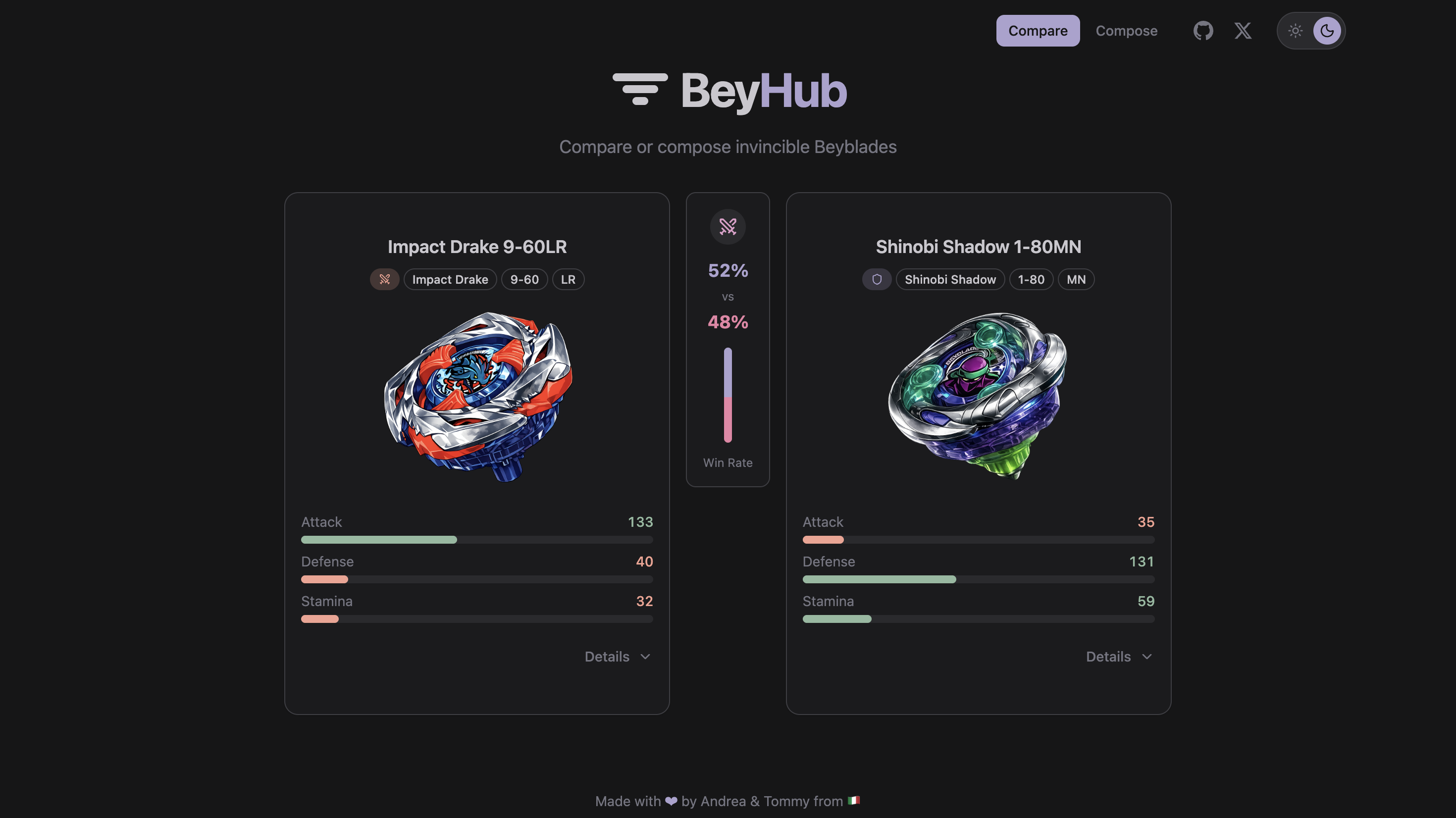
A web application for comparing and compose beyblades.
Overview
[!IMPORTANT] Experimenting vibe-coding. I never checked anything regarding the code
BeyHub allows you to:
- Compare Beyblades: Select two beyblades and compare their stats side-by-side
- View Win Probability: See estimated win percentages based on stats
- Explore Stats: View detailed blade, ratchet, and bit statistics
- Compose Beyblades: Create custom beyblade combinations from available components
Key Features
- Search-based beyblade selection with autocomplete (
Cmd+Kto open) - Side-by-side stat comparison with visual bars
- Custom beyblade composition with strategy presets (balanced, attack, defense, stamina)
- Light/Dark theme toggle (
Cmd+Dto switch) - Mobile-responsive design
- Expandable component details (Blade, Ratchet, Bit stats)
Prerequisites
- Bun >= 1.x (latest LTS recommended)
- Git
Getting Started
Installation
-
Clone the repository:
git clone https://github.com/andreafspeziale/beyhub.git cd beyhub -
Install dependencies:
bun install -
Start the development server:
bun run dev -
Open your browser and navigate to
http://localhost:5173
Available Scripts
| Script | Description |
|---|---|
bun run dev | Start development server with hot reload |
bun run build | Build for production |
bun run preview | Preview production build locally |
bun run lint | Run Biome linter |
bun run format | Format code with Biome |
bun run check | Run linter and formatter checks (used in pre-commit) |
bun test | Run unit tests with Vitest |
bun run test:coverage | Run tests with coverage report |
Project Structure
beyhub/
├── public/
│   ├── assets/beyblades/    # Beyblade images
│   └── data/
│       └── beyblades.json   # Beyblade data
├── src/
│   ├── components/          # React components
│   │   ├── comparison/      # Comparison feature components
│   │   ├── compose/         # Compose feature components
│   │   ├── error/           # Error boundaries
│   │   ├── layout/          # Layout components (Header, Nav, ThemeToggle)
│   │   └── ui/              # shadcn/ui components
│   ├── hooks/               # Custom React hooks
│   ├── pages/               # Page components
│   ├── schemas/             # Zod validation schemas
│   ├── types/               # TypeScript types
│   ├── utils/               # Utility functions
│   └── App.tsx              # Main app component
Beyblade Data
JSON Structure
Beyblades are stored in /public/data/beyblades.json:
{
  "beyblades": [
    {
      "id": "impact_drake_9_60LR",
      "name": "Impact Drake 9-60LR",
      "type": "Attack",
      "bladeName": "Impact Drake",
      "ratchetName": "9-60",
      "bitName": "LR",
      "blade": {
        "attack": 75,
        "defense": 25,
        "stamina": 10
      },
      "ratchet": {
        "attack": 13,
        "defense": 10,
        "stamina": 7,
        "height": 60
      },
      "bit": {
        "attack": 45,
        "defense": 5,
        "stamina": 15,
        "dash": 35,
        "burst": 80
      },
      "image": "/assets/beyblades/impact_drake_9_60LR.png"
    }
  ]
}
Adding New Beyblades
Via Pull Request (Recommended):
- Fork the repository
- Add entry to
public/data/beyblades.jsonfollowing the structure above - Use snake_case for
id(e.g.,beyblade_name_parts) - Provide all required stats as integers
- Add image to
/public/assets/beyblades/or use placeholder URL - Submit PR with clear description and source for stats
- Data validation runs automatically on app startup
Development Workflow
Code Quality
This project uses strict code quality tools:
- Biome: Linting and formatting
- Import sorting by type
- Single quotes, semicolons required
- Line length: 100 characters
- TypeScript: Strict mode, no
anytypes allowed - Husky: Git hooks for automated checks
Making Changes
-
Create a new branch:
git checkout -b feat/your-feature-name -
Make your changes following the code style
-
Run checks before committing:
bun run check -
Commit using conventional commit format:
git commit -m "feat(scope): description"
Commit Convention
Format: type(scope): description
Types:
feat: New featurefix: Bug fixdocs: Documentation changesstyle: Code style changesrefactor: Code refactoringtest: Test changeschore: Maintenance tasks
Examples:
git commit -m "feat(comparison): add win probability calculation"
git commit -m "fix(search): correct fuzzy matching logic"
git commit -m "docs(readme): update installation instructions"
Pre-commit Hooks
Husky automatically runs:
- Biome linter on staged files
- Biome formatter on staged files
- Commit message validation (commitlint)
If checks fail, fix the issues and commit again.
Testing
Running Tests
# Run all tests
bun test

# Run tests in watch mode
bun test --watch

# Run with coverage
bun test --coverage
Test Coverage
Unit tests cover:
- Win probability calculations
- Stat aggregation functions
- Search/filter functionality
Tests are located in __tests__ directories alongside source files.
Tech Stack
- Runtime: Bun
- Framework: React 19 + TypeScript
- Build Tool: Vite
- Styling: Tailwind CSS v4 + shadcn/ui
- Validation: Zod
- Linting/Formatting: Biome
- Testing: Vitest
Stay in touch
- Author - Andrea Francesco Speziale
- Beyblade Community - Beyblade Wiki
License
BeyHub is MIT licensed.
Tags
Similar Tools
WindChat
v0.dev open-source alternative browser extension
TechEuphoria
Modern web application for technology enthusiasts event
100 Days of Code
Daily challenges - Vibe code with AI
unCover
VerifiedWrite AI-generated cover letters in seconds
Intellectia
VerifiedGuardian against misleading AI-generated content
Infinite Tales RPG
VerifiedChoose-your-own-adventure RPG with AI-generated stories