Billmanager
Track monthly bills and subscriptions
AI-Agent Assisted
Tier 2README
BillManager - Financial Tracker
A secure multi-user web application for tracking recurring expenses and income with complete data separation. Built with React + Mantine frontend and Flask + PostgreSQL backend.
🎉 What's New in v3.8.1
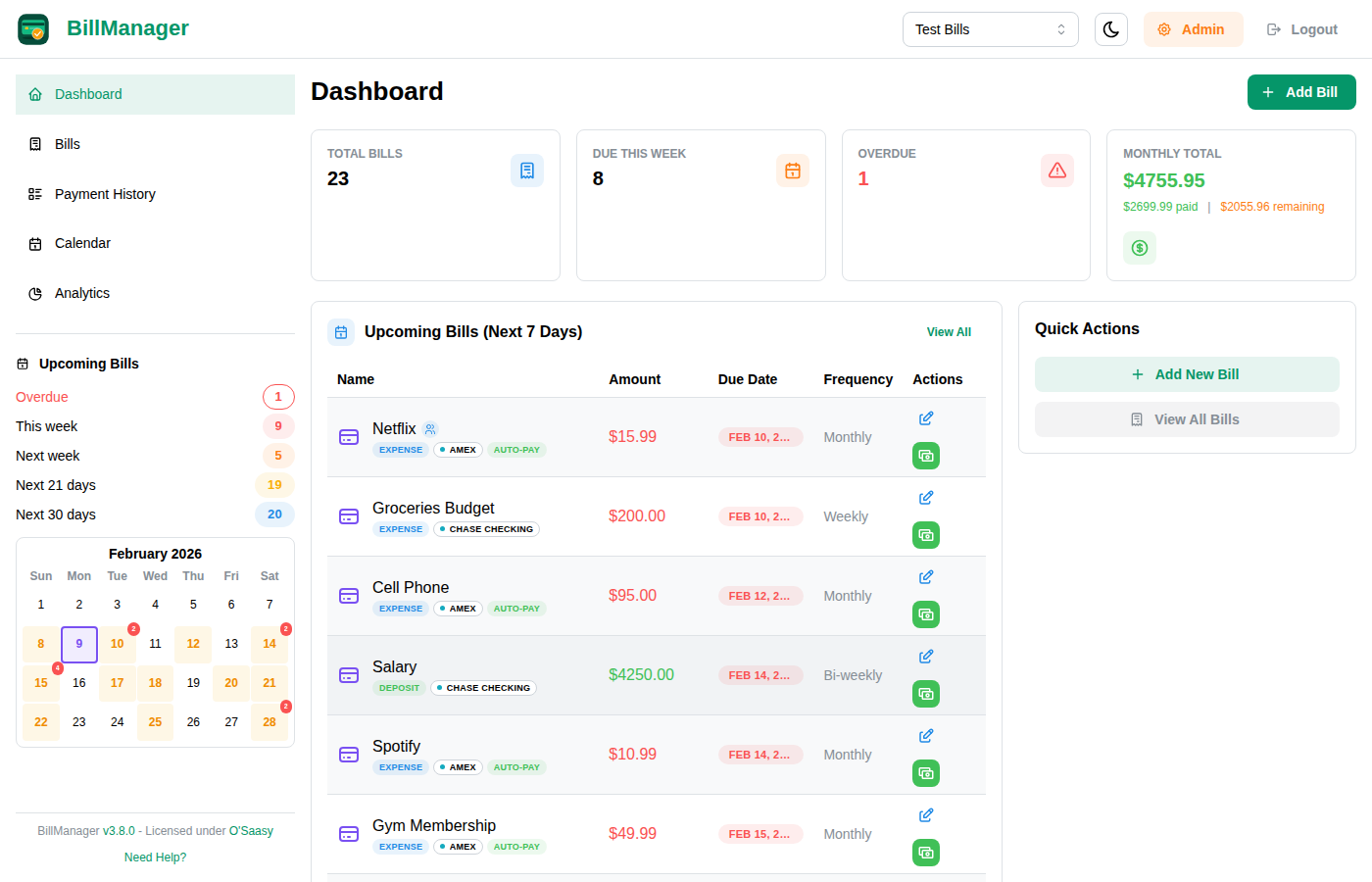
Dashboard & Analytics Overhaul - New Dashboard, Calendar, and Analytics pages with spending trends, interactive stat cards, and improved navigation.
Highlights
- Dashboard Page - At-a-glance stat cards (Total Bills, Due This Week, Overdue, Monthly Total) with clickable navigation
- Calendar Page - Multi-month calendar view with bill due date indicators
- Analytics Page - Spending trends charts, account pie chart, year-over-year comparison, and yearly summary with labeled totals
- Filter Indicators - Clear visual banner on Bills page when filters are active
- Improved Navigation - Sidebar calendar and Upcoming Bills filters navigate directly to filtered Bills view
- Payment History - Dedicated sidebar nav link and default 30-day date range
Bug Fixes
- Fixed editing payments from All Payments page not saving changes
- Fixed deleting payments not refreshing the list
- Fixed yearly summary background too bright in dark mode
- Fixed "Today" button text clipped on Calendar page
Features
- Income & Expense Tracking: Track both recurring bills and deposits to forecast cash flow
- Account Management: Organize transactions by account with intelligent filtering
- Payment Analytics: Visual charts and comprehensive payment history across all transactions
- Multi-Tenant Architecture: Row-level data isolation with granular user permissions
- Enhanced Frequencies: Weekly, bi-weekly, monthly (including 1st & 15th), quarterly, yearly, and custom schedules
- Auto-Payments: Automatic payment processing for recurring transactions
- Modern UI: Responsive design with dark/light mode, 70+ custom icons, and visual calendar
- Mobile App: Native iOS and Android apps with offline support and push notifications
- Email Invitations: Invite users via email with configurable roles and access control
- Bill Groups: Organize finances into separate groups (personal, business, family, etc.)
- Bill Sharing: Share bills with other users and split costs by percentage, fixed amount, or equally
License
This project is licensed under the O'Saasy License - a modified MIT license that permits broad use while restricting SaaS commercialization by third parties.
Learn more at osaasy.dev
Quick Start
Prerequisites
- Docker and Docker Compose installed
- Web browser
Run the Application
-
Create a
docker-compose.ymlfile with the following content:services: bills-app: image: ghcr.io/brdweb/billmanager:latest container_name: billmanager ports: - "5000:5000" restart: unless-stopped environment: - DATABASE_URL=postgresql://billsuser:billspass@db:5432/billsdb - FLASK_SECRET_KEY=change-this-to-a-secure-random-string depends_on: - db db: image: postgres:16-alpine container_name: bills-db restart: unless-stopped environment: - POSTGRES_USER=billsuser - POSTGRES_PASSWORD=billspass - POSTGRES_DB=billsdb volumes: - postgres_data:/var/lib/postgresql/data volumes: postgres_data: -
Run the application:
docker compose up -d -
Open your browser and visit: http://localhost:5000
Using Your Own PostgreSQL Database
If you already have a PostgreSQL server or prefer to use a managed database service (AWS RDS, DigitalOcean, Supabase, etc.), you can run just the application container:
-
Create your database on your PostgreSQL server:
CREATE DATABASE billsdb; CREATE USER billsuser WITH ENCRYPTED PASSWORD 'your-secure-password'; GRANT ALL PRIVILEGES ON DATABASE billsdb TO billsuser; -
Create a simplified
docker-compose.yml:services: bills-app: image: ghcr.io/brdweb/billmanager:latest container_name: billmanager ports: - "5000:5000" restart: unless-stopped environment: - DATABASE_URL=postgresql://billsuser:your-secure-password@your-db-host:5432/billsdb - FLASK_SECRET_KEY=change-this-to-a-secure-random-string -
Or run with Docker directly:
docker run -d \
  --name billmanager \
  -p 5000:5000 \
  -e DATABASE_URL=postgresql://billsuser:your-secure-password@your-db-host:5432/billsdb \
  -e FLASK_SECRET_KEY=change-this-to-a-secure-random-string \
  ghcr.io/brdweb/billmanager:latest
Database URL Format:
postgresql://USERNAME:PASSWORD@HOST:PORT/DATABASE
| Component | Example | Description |
|---|---|---|
| USERNAME | billsuser | PostgreSQL username |
| PASSWORD | secretpass | PostgreSQL password (URL-encode special characters) |
| HOST | db.example.com | Database server hostname or IP |
| PORT | 5432 | PostgreSQL port (default: 5432) |
| DATABASE | billsdb | Database name |
Examples:
- Local:
postgresql://billsuser:pass@localhost:5432/billsdb - Remote:
postgresql://billsuser:[email protected]:5432/billsdb - AWS RDS:
postgresql://billsuser:[email protected]:5432/billsdb - Supabase:
postgresql://postgres:[email protected]:5432/postgres
Environment Variables
| Variable | Description | Default |
|---|---|---|
DATABASE_URL | PostgreSQL connection string | postgresql://billsuser:billspass@db:5432/billsdb |
FLASK_SECRET_KEY | Secret key for session encryption | Required in production |
JWT_SECRET_KEY | Secret key for mobile API tokens | Falls back to FLASK_SECRET_KEY |
RESEND_API_KEY | Email provider API key (enables invitations) | None |
FROM_EMAIL | Sender email address | None |
APP_URL | Application URL for email links | http://localhost:5000 |
ALLOWED_ORIGINS | Comma-separated list of allowed CORS origins | Uses APP_URL or localhost |
DEPLOYMENT_MODE | self-hosted or saas | self-hosted |
Security Note: In production, JWT_SECRET_KEY or FLASK_SECRET_KEY must be explicitly set. The application will refuse to start without it. Generate secure keys with: openssl rand -hex 32
CORS Configuration
BillManager uses a three-tier priority system for CORS origins:
ALLOWED_ORIGINS- Explicit comma-separated list (e.g.,https://app1.com,https://app2.com)APP_URL- Single origin for typical deployments- Localhost defaults - For development without configuration
This ensures secure self-hosted deployments while remaining flexible for development.
For complete configuration options, see the Self-Hosted Installation Guide.
First Login
On first startup, BillManager creates a default admin account with a randomly generated secure password. This password is printed to the container logs:
docker-compose logs billmanager | grep -A 5 "INITIAL ADMIN CREDENTIALS"
You will see:
============================================================
INITIAL ADMIN CREDENTIALS (save these now!)
   Username: admin
   Password: xK9mP2vL7nQr3wYz
   You will be required to change this password on first login.
============================================================
Save this password immediately! It is only shown once during initial startup.
For detailed setup and usage instructions, see the documentation.
Sharing Bills
BillManager allows you to share bills with other users and split costs in flexible ways:
Creating a Share
- Open any bill in your database
- Click the "Share" button
- Enter the recipient's username or email address
- Choose how to split the bill:
- Percentage: Split by percentage (e.g., 50% each)
- Fixed Amount: Assign a fixed dollar amount to the recipient
- Equal: Split equally among all recipients
- Full Amount: Share the full bill amount (no split)
Accepting Shares
Username-based shares (self-hosted):
- Recipients receive a notification and can accept/decline in the "Shared Bills" section
Email-based shares (SaaS):
- Recipients receive an email invitation with a secure link
- Click the link and log in (or create an account) to accept the share
Managing Shared Bills
As the Bill Owner:
- View all shares for your bills
- Update split configurations
- Revoke shares at any time
- See recipient payment status
As a Share Recipient:
- View bills shared with you in-line with your own bills
- Mark your portion as paid to track your contributions
- Leave a shared bill if you no longer need access
Payment Tracking
When a bill is shared:
- Recipients can mark their portion as paid independently
- Owners can see who has paid their share
- Payment dates are tracked separately for each recipient
Security
- Only bill owners can create, update, or revoke shares
- Only the intended recipient can accept a share
- Email shares require token-based verification
- All share operations are logged for audit purposes
For more details, see the Sharing Bills Guide in the documentation.
Documentation
Complete documentation is available at docs.billmanager.app:
Application Management
Start Application
docker compose up -d
View Logs
docker compose logs -f bills-app
Stop Application
docker compose down
Update to New Version
docker compose pull
docker compose down
docker compose up -d
Backup PostgreSQL Data
# Create backup
docker exec bills-db pg_dump -U billsuser billsdb > backup.sql

# Restore backup
docker exec -i bills-db psql -U billsuser billsdb < backup.sql
Data Persistence
Docker Compose uses a named volume for PostgreSQL data:
postgres_data- All application data (users, databases, bills, payments)- Your data is automatically preserved between deployments!
Security Features
- Secure Default Credentials: Random admin password generated on first run (self-hosted)
- Forced Password Change: Admin credentials require immediate password update on first login
- Production-Safe Configuration: Secret keys must be explicitly set in production
- Input Validation: Comprehensive server-side validation for all user inputs
- Rate Limiting: All API endpoints protected with tiered rate limits (60/min reads, 30/min writes)
- Row-Level Isolation: Complete data separation between user groups
- JWT Authentication: Secure token-based authentication for all clients
- CORS Protection: Configurable allowed origins for API security
- Password Requirements: Strong password enforcement (8+ chars, uppercase, lowercase, digit)
- Email Verification: Optional email verification for new accounts
- HTTPS Ready: Deploy behind a reverse proxy (Traefik, nginx, Caddy) for SSL
- Content Security Policy: Strict CSP headers prevent XSS and injection attacks
- Secure Token Storage: Mobile apps use platform-secure storage (Keychain/Keystore) with backup exclusion
Technical Details
Architecture
- Frontend (Web): React 19 + TypeScript + Mantine 7 + Vite
- Frontend (Mobile): React Native + Expo + TypeScript
- Backend: Python 3.12+ + Flask + SQLAlchemy ORM
- Database: PostgreSQL 16 with row-level tenancy
- Authentication: JWT tokens (access + refresh)
- WSGI Server: Gunicorn
- Deployment: Docker Compose with persistent volumes
API
- REST API (v2): JWT-based authentication at
/api/v2/* - Documentation: Interactive Swagger UI at
/api/v2/docs - Features: Delta sync, offline support, device registration, push notifications
- Legacy API (v1): Session-based endpoints at
/login,/bills, etc. (deprecated)
Key Technologies
- Icons: Tabler Icons (70+ categories)
- Email: Resend for transactional emails
- Security: Flask-Limiter, Flask-Talisman, bcrypt password hashing
- Validation: Server-side input validation with RFC-compliant patterns
Ready to organize your finances securely? Get started with BillManager!
Licensed under O'Saasy | Documentation | View on GitHub
Tags
Similar Tools
Traktarr
Export Trakt history without subscription
Gemini Voyager
Enhancement suite for Google Gemini
Vibesdk
Open-source vibe coding platform on Cloudflare
Kornelius
Your vibe coding prompt companion
Stagewise
VerifiedFrontend coding agent for production codebases
NewRev
VerifiedOpen-source coding agent like Cursor/Windsurf in your browser