CodexBar
Usage stats for Codex and Claude Code on macOS
Verified AI-Agent Built
Tier 1README
CodexBar 🎚️ - May your tokens never run out.
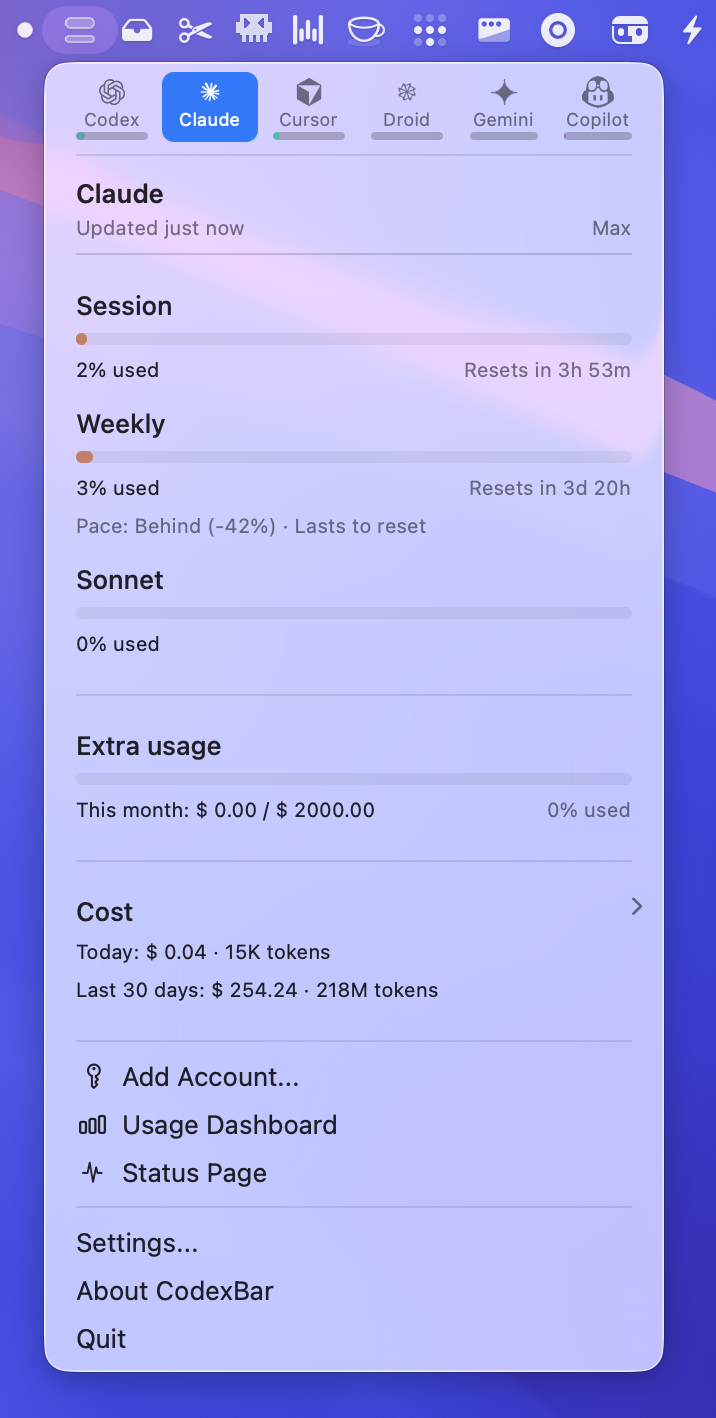
Tiny macOS 14+ menu bar app that keeps your Codex, Claude, Cursor, Gemini, Antigravity, Droid (Factory), Copilot, z.ai, Kiro, Vertex AI, Augment, Amp, JetBrains AI, and OpenRouter limits visible (session + weekly where available) and shows when each window resets. One status item per provider (or Merge Icons mode with a provider switcher and optional Overview tab); enable what you use from Settings. No Dock icon, minimal UI, dynamic bar icons in the menu bar.
Install
Requirements
- macOS 14+ (Sonoma)
GitHub Releases
Download: https://github.com/steipete/CodexBar/releases
Homebrew
brew install --cask steipete/tap/codexbar
Linux (CLI only)
brew install steipete/tap/codexbar
Or download CodexBarCLI-v<tag>-linux-<arch>.tar.gz from GitHub Releases.
Linux support via Omarchy: community Waybar module and TUI, driven by the codexbar executable.
First run
- Open Settings → Providers and enable what you use.
- Install/sign in to the provider sources you rely on (e.g.
codex,claude,gemini, browser cookies, or OAuth; Antigravity requires the Antigravity app running). - Optional: Settings → Providers → Codex → OpenAI cookies (Automatic or Manual) to add dashboard extras.
Providers
- Codex — Local Codex CLI RPC (+ PTY fallback) and optional OpenAI web dashboard extras.
- Claude — OAuth API or browser cookies (+ CLI PTY fallback); session + weekly usage.
- Cursor — Browser session cookies for plan + usage + billing resets.
- Gemini — OAuth-backed quota API using Gemini CLI credentials (no browser cookies).
- Antigravity — Local language server probe (experimental); no external auth.
- Droid — Browser cookies + WorkOS token flows for Factory usage + billing.
- Copilot — GitHub device flow + Copilot internal usage API.
- z.ai — API token (Keychain) for quota + MCP windows.
- Kimi — Auth token (JWT from
kimi-authcookie) for weekly quota + 5‑hour rate limit. - Kimi K2 — API key for credit-based usage totals.
- Kiro — CLI-based usage via
kiro-cli /usagecommand; monthly credits + bonus credits. - Vertex AI — Google Cloud gcloud OAuth with token cost tracking from local Claude logs.
- Augment — Browser cookie-based authentication with automatic session keepalive; credits tracking and usage monitoring.
- Amp — Browser cookie-based authentication with Amp Free usage tracking.
- JetBrains AI — Local XML-based quota from JetBrains IDE configuration; monthly credits tracking.
- OpenRouter — API token for credit-based usage tracking across multiple AI providers.
- Open to new providers: provider authoring guide.
Icon & Screenshot
The menu bar icon is a tiny two-bar meter:
- Top bar: 5‑hour/session window. If weekly is missing/exhausted and credits are available, it becomes a thicker credits bar.
- Bottom bar: weekly window (hairline).
- Errors/stale data dim the icon; status overlays indicate incidents.
Features
- Multi-provider menu bar with per-provider toggles (Settings → Providers).
- Session + weekly meters with reset countdowns.
- Optional Codex web dashboard enrichments (code review remaining, usage breakdown, credits history).
- Local cost-usage scan for Codex + Claude (last 30 days).
- Provider status polling with incident badges in the menu and icon overlay.
- Merge Icons mode to combine providers into one status item + switcher, with an optional Overview tab for up to three providers.
- Refresh cadence presets (manual, 1m, 2m, 5m, 15m).
- Bundled CLI (
codexbar) for scripts and CI (includingcodexbar cost --provider codex|claudefor local cost usage); Linux CLI builds available. - WidgetKit widget mirrors the menu card snapshot.
- Privacy-first: on-device parsing by default; browser cookies are opt-in and reused (no passwords stored).
Privacy note
Wondering if CodexBar scans your disk? It doesn’t crawl your filesystem; it reads a small set of known locations (browser cookies/local storage, local JSONL logs) when the related features are enabled. See the discussion and audit notes in issue #12.
macOS permissions (why they’re needed)
- Full Disk Access (optional): only required to read Safari cookies/local storage for web-based providers (Codex web, Claude web, Cursor, Droid/Factory). If you don’t grant it, use Chrome/Firefox cookies or CLI-only sources instead.
- Keychain access (prompted by macOS):
- Chrome cookie import needs the “Chrome Safe Storage” key to decrypt cookies.
- Claude OAuth credentials (written by the Claude CLI) are read from Keychain when present.
- z.ai API token is stored in Keychain from Preferences → Providers; Copilot stores its API token in Keychain during device flow.
- How do I prevent those keychain alerts?
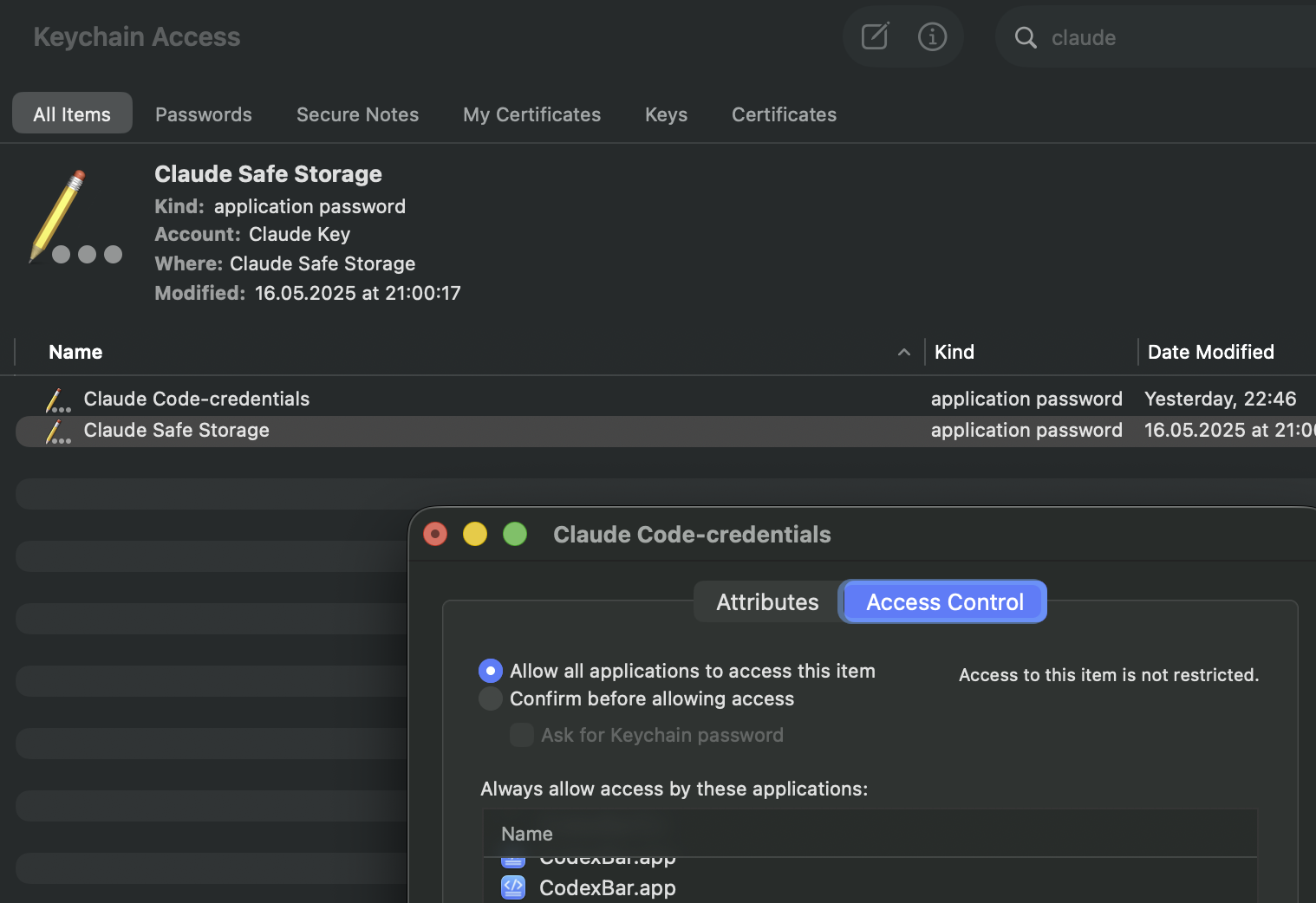
- Open Keychain Access.app → login keychain → search the item (e.g., “Claude Code-credentials”).
- Open the item → Access Control → add
CodexBar.appunder “Always allow access by these applications”. - Prefer adding just CodexBar (avoid “Allow all applications” unless you want it wide open).
- Relaunch CodexBar after saving.
- Reference screenshot:
- How to do the same for the browser?
- Find the browser’s “Safe Storage” key (e.g., “Chrome Safe Storage”, “Brave Safe Storage”, “Firefox”, “Microsoft Edge Safe Storage”).
- Open the item → Access Control → add
CodexBar.appunder “Always allow access by these applications”. - This removes the prompt when CodexBar decrypts cookies for that browser.
- Files & Folders prompts (folder/volume access): CodexBar launches provider CLIs (codex/claude/gemini/antigravity). If those CLIs read a project directory or external drive, macOS may ask CodexBar for that folder/volume (e.g., Desktop or an external volume). This is driven by the CLI’s working directory, not background disk scanning.
- What we do not request: no Screen Recording, Accessibility, or Automation permissions; no passwords are stored (browser cookies are reused when you opt in).
Docs
- Providers overview: docs/providers.md
- Provider authoring: docs/provider.md
- UI & icon notes: docs/ui.md
- CLI reference: docs/cli.md
- Architecture: docs/architecture.md
- Refresh loop: docs/refresh-loop.md
- Status polling: docs/status.md
- Sparkle updates: docs/sparkle.md
- Release checklist: docs/RELEASING.md
Getting started (dev)
- Clone the repo and open it in Xcode or run the scripts directly.
- Launch once, then toggle providers in Settings → Providers.
- Install/sign in to provider sources you rely on (CLIs, browser cookies, or OAuth).
- Optional: set OpenAI cookies (Automatic or Manual) for Codex dashboard extras.
Build from source
swift build -c release          # or debug for development
./Scripts/package_app.sh        # builds CodexBar.app in-place
CODEXBAR_SIGNING=adhoc ./Scripts/package_app.sh  # ad-hoc signing (no Apple Developer account)
open CodexBar.app
Dev loop:
./Scripts/compile_and_run.sh
Related
- ✂️ Trimmy — “Paste once, run once.” Flatten multi-line shell snippets so they paste and run.
- 🧳 MCPorter — TypeScript toolkit + CLI for Model Context Protocol servers.
- 🧿 oracle — Ask the oracle when you're stuck. Invoke GPT-5 Pro with a custom context and files.
Looking for a Windows version?
Credits
Inspired by ccusage (MIT), specifically the cost usage tracking.
License
MIT • Peter Steinberger (steipete)
Tags
Similar Tools
Just Speak
System-wide offline voice dictation for macOS
CrateBot5
Audio fingerprinting for DJs
My Claude Code Setup
VerifiedStarter template and CLAUDE.md memory bank
Claudit
Claude Code management UI
Claude Hub
VerifiedClaude integration hub
Pomodoro App
Modern macOS Pomodoro focus tool