Homedashboard Test
ESP32 home assistant dashboard
Verified AI-Agent Built
Tier 1README
ESP32 Home Assistant Display
Real-time solar and battery monitoring dashboard on an ESP32 with 3.5" touchscreen. Displays Home Assistant sensor data with 6-hour history charts using LVGL.



Features
- 3-page touchscreen UI with left/right navigation
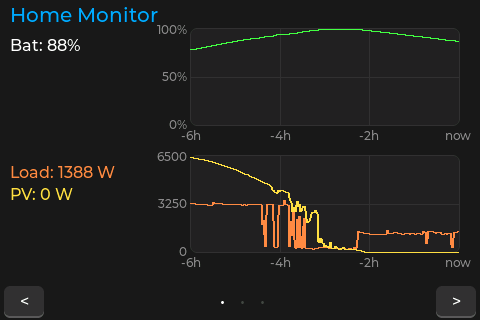
- Home: 6-hour history charts for battery SOC and power (load + PV)
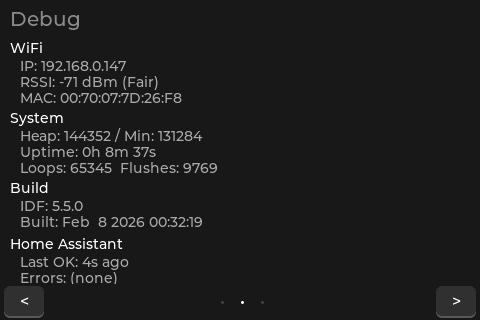
- Debug: WiFi, heap, uptime, build info, HA status
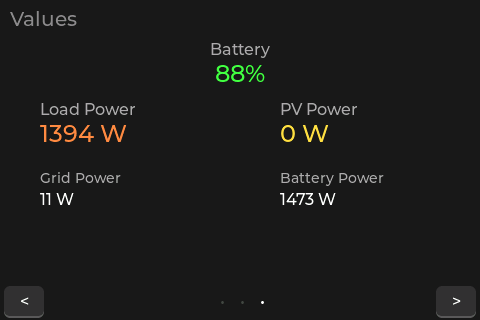
- Values: Large-font sensor readings (SOC, load, PV, grid, battery power)
- Streaming history parser -- handles any response size, no buffer limits
- 270-point charts (1 pixel per data point) with per-bin averaging
- Auto-reconnecting WiFi with SNTP time sync
- Screenshot capture over TCP or serial for remote debugging
- Static analysis with clang-tidy (
./scripts/lint.sh)
Hardware
- ESP32 3.5" TFT Development Board (LCD Wiki)
- Display: 480x320 ST7796 TFT LCD (SPI, landscape)
- Touch: XPT2046 resistive touchscreen (shared SPI bus)
- Power: USB (500mA+)
No additional wiring needed -- display and touch are integrated on the board.
Pin Configuration
Display (ST7796, SPI2_HOST @ 40MHz):
  CS=15  DC=2  MOSI=13  SCLK=14  MISO=12  BL=27

Touch (XPT2046, shared SPI2_HOST @ 2.5MHz):
  CS=33  IRQ=36 (unused -- pressure detection via SPI)
Quick Start
1. Install PlatformIO
pip install platformio
2. Configure Credentials
cp include/secrets.h.example include/secrets.h
Edit include/secrets.h with your:
- WiFi SSID and password (2.4GHz only)
- Home Assistant server URL and long-lived access token
- Entity IDs for battery SOC, load power, PV power, grid power, battery power
3. Build and Flash
pio run -e usb --target upload    # USB upload
pio device monitor                # Serial monitor (115200 baud)
4. OTA Upload (after initial USB flash)
pio run -e ota --target upload
UI Pages
Home -- Charts
Two 6-hour history charts with current values:
Debug -- System Info
WiFi status (IP, RSSI, MAC), heap usage, uptime, loop/flush counts, ESP-IDF version, HA fetch status.
Values -- Large Readings
Battery SOC (color-coded), load power, PV power, grid power, battery power in large font for at-a-glance reading.
Configuration
Entity IDs (secrets.h)
#define HA_ENTITY_BATTERY_SOC   "sensor.your_battery_soc"
#define HA_ENTITY_LOAD_POWER    "sensor.your_load_power"
#define HA_ENTITY_PV_POWER      "sensor.your_pv_power"
#define HA_ENTITY_GRID_POWER    "sensor.your_grid_power"
#define HA_ENTITY_BATTERY_POWER "sensor.your_battery_power"
Update Intervals (config.h)
| Setting | Default | Description |
|---|---|---|
HA_UPDATE_INTERVAL | 10s | Current sensor values |
HISTORY_UPDATE_INTERVAL | 60s | 6-hour chart data |
INFLUX_UPDATE_INTERVAL | 15s | InfluxDB (placeholder) |
History Charts
- Duration: 6 hours (
HISTORY_HOURS) - Resolution: 270 bins = 1 per chart pixel (~80 seconds each)
- Method: Streaming parse with per-bin averaging -- handles thousands of data points without buffer limits
- Fill: Zero-order hold (forward + backward) for gap-free rendering
Screenshots
Capture what the display shows remotely:
# TCP (fast, requires WiFi)
python3 scripts/screenshot.py tcp <ESP32_IP>
python3 scripts/screenshot.py tcp <ESP32_IP> --watch 5    # every 5s

# Serial (works before WiFi, slower)
python3 scripts/screenshot.py serial /dev/ttyUSB0
Software Architecture
Stack
| Layer | Technology |
|---|---|
| Framework | ESP-IDF (native, not Arduino) |
| Graphics | LVGL v8.3 |
| Display | Custom ST7796 SPI driver |
| Touch | Custom XPT2046 SPI driver |
| HTTP | esp_http_client |
| JSON | cJSON (entity state) / manual parse (history stream) |
| WiFi | esp_wifi + esp_event (event-driven, auto-reconnect) |
| Time | SNTP via esp_sntp |
| Build | PlatformIO with ccache |
File Structure
src/
  main.cpp              Entry point, LVGL UI, main loop
  display_driver.c/h    ST7796 SPI driver
  touch_driver.c/h      XPT2046 touch driver
  wifi_manager.c/h      WiFi with auto-reconnect, RSSI, MAC
  http_client.c/h       HA API client with streaming history parser
  screenshot_server.c/h BMP capture over TCP/serial
include/
  config.h              Pins, intervals, chart layout constants
  secrets.h             Credentials (not in git)
  secrets.h.example     Credentials template
  lv_conf.h             LVGL configuration
scripts/
  lint.sh               clang-tidy static analysis
  screenshot.py         Remote screenshot capture
Troubleshooting
| Problem | Fix |
|---|---|
| WiFi won't connect | Check SSID/password, ensure 2.4GHz network |
| "HA fetch failed" | Verify token, URL (include http://), entity IDs |
| Display blank | Check USB power (500mA+), serial monitor for errors |
| Charts flat/empty | Wait 60s for first history fetch; check SNTP sync in serial log |
| Touch unresponsive | Touch uses pressure detection, not IRQ; press firmly |
| Memory crashes | Check heap in Debug page; reduce LV_MEM_SIZE in lv_conf.h |
Serial Monitor
pio device monitor # 115200 baud
Log tags: main, display, touch, wifi, http. Look for History: N raw points streamed to verify chart data flow.
Resources
- LCD Wiki - ESP32-32E Display
- LVGL v8.3 Documentation
- ESP-IDF Programming Guide
- Home Assistant REST API
- PlatformIO ESP32
License
MIT License
Tags
Similar Tools
Kafka GUI Tool
VerifiedKafka GUI tool
Claude AI Mini Snake Game
Snake game built entirely with Claude
Claudecodeui
VerifiedFree open source webui/GUI for Claude Code
Sharethis
VerifiedShare text and files via P2P and WebSockets
Life OS Template
Single HTML file life and business manager
Splitpot
Planning poker application