Claude Hud
Plugin showing context usage and active tools
Verified AI-Agent Built
Tier 1README
Claude HUD
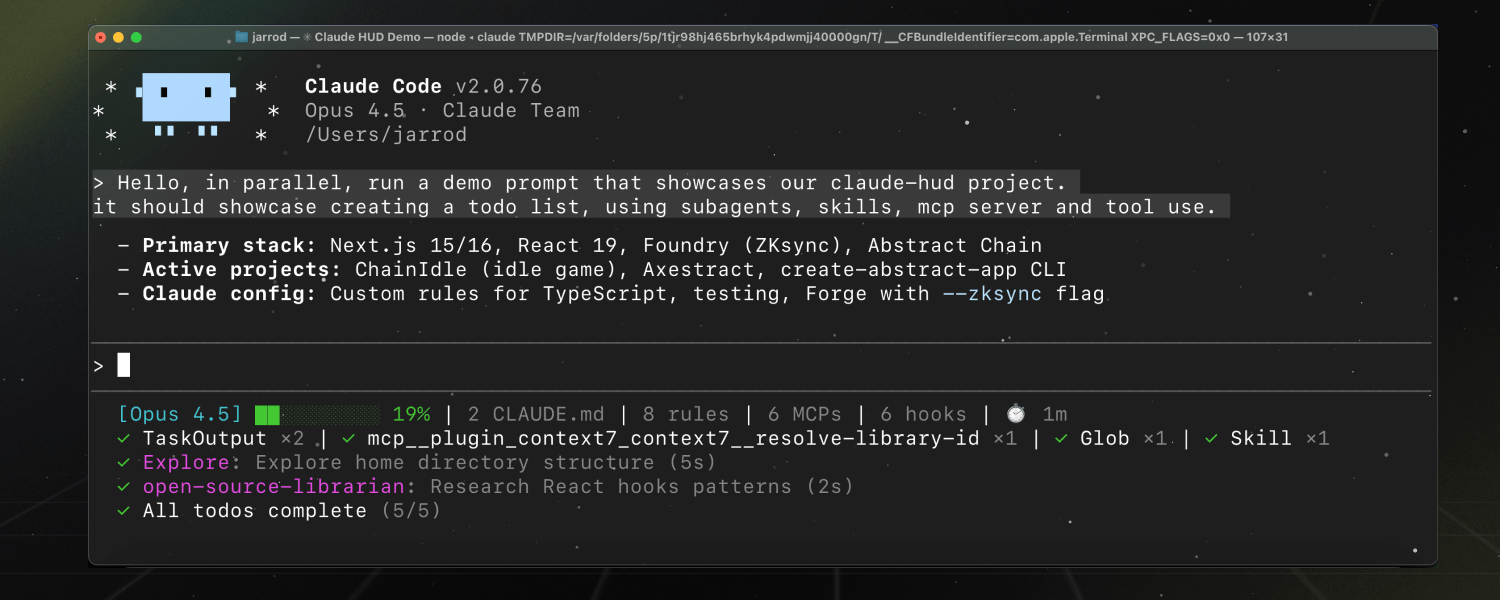
A Claude Code plugin that shows what's happening — context usage, active tools, running agents, and todo progress. Always visible below your input.


Install
Inside a Claude Code instance, run the following commands:
Step 1: Add the marketplace
/plugin marketplace add jarrodwatts/claude-hud
Step 2: Install the plugin
⚠️ Linux users: Click here first
On Linux, /tmp is often a separate filesystem (tmpfs), which causes plugin installation to fail with:
EXDEV: cross-device link not permitted
Fix: Set TMPDIR before installing:
mkdir -p ~/.cache/tmp && TMPDIR=~/.cache/tmp claude
Then run the install command below in that session. This is a Claude Code platform limitation.
/plugin install claude-hud
Step 3: Configure the statusline
/claude-hud:setup
Done! The HUD appears immediately — no restart needed.
What is Claude HUD?
Claude HUD gives you better insights into what's happening in your Claude Code session.
| What You See | Why It Matters |
|---|---|
| Project path | Know which project you're in (configurable 1-3 directory levels) |
| Context health | Know exactly how full your context window is before it's too late |
| Tool activity | Watch Claude read, edit, and search files as it happens |
| Agent tracking | See which subagents are running and what they're doing |
| Todo progress | Track task completion in real-time |
What You See
Default (2 lines)
[Opus | Max] │ my-project git:(main*)
Context █████░░░░░ 45% │ Usage ██░░░░░░░░ 25% (1h 30m / 5h)
- Line 1 — Model, plan name (or
Bedrock), project path, git branch - Line 2 — Context bar (green → yellow → red) and usage rate limits
Optional lines (enable via /claude-hud:configure)
◐ Edit: auth.ts | ✓ Read ×3 | ✓ Grep ×2        ← Tools activity
◐ explore [haiku]: Finding auth code (2m 15s)    ← Agent status
▸ Fix authentication bug (2/5)                   ← Todo progress
How It Works
Claude HUD uses Claude Code's native statusline API — no separate window, no tmux required, works in any terminal.
Claude Code → stdin JSON → claude-hud → stdout → displayed in your terminal
           ↘ transcript JSONL (tools, agents, todos)
Key features:
- Native token data from Claude Code (not estimated)
- Parses the transcript for tool/agent activity
- Updates every ~300ms
Configuration
Customize your HUD anytime:
/claude-hud:configure
The guided flow walks you through customization — no manual editing needed:
- First time setup: Choose a preset (Full/Essential/Minimal), then fine-tune individual elements
- Customize anytime: Toggle items on/off, adjust git display style, switch layouts
- Preview before saving: See exactly how your HUD will look before committing changes
Presets
| Preset | What's Shown |
|---|---|
| Full | Everything enabled — tools, agents, todos, git, usage, duration |
| Essential | Activity lines + git status, minimal info clutter |
| Minimal | Core only — just model name and context bar |
After choosing a preset, you can turn individual elements on or off.
Manual Configuration
You can also edit the config file directly at ~/.claude/plugins/claude-hud/config.json.
Options
| Option | Type | Default | Description |
|---|---|---|---|
lineLayout | string | expanded | Layout: expanded (multi-line) or compact (single line) |
pathLevels | 1-3 | 1 | Directory levels to show in project path |
gitStatus.enabled | boolean | true | Show git branch in HUD |
gitStatus.showDirty | boolean | true | Show * for uncommitted changes |
gitStatus.showAheadBehind | boolean | false | Show ↑N ↓N for ahead/behind remote |
gitStatus.showFileStats | boolean | false | Show file change counts !M +A ✘D ?U |
display.showModel | boolean | true | Show model name [Opus] |
display.showContextBar | boolean | true | Show visual context bar ████░░░░░░ |
display.contextValue | percent | tokens | percent | Context display format (45% or 45k/200k) |
display.showConfigCounts | boolean | false | Show CLAUDE.md, rules, MCPs, hooks counts |
display.showDuration | boolean | false | Show session duration ⏱️ 5m |
display.showSpeed | boolean | false | Show output token speed out: 42.1 tok/s |
display.showUsage | boolean | true | Show usage limits (Pro/Max/Team only) |
display.usageBarEnabled | boolean | true | Display usage as visual bar instead of text |
display.sevenDayThreshold | 0-100 | 80 | Show 7-day usage when >= threshold (0 = always) |
display.showTokenBreakdown | boolean | true | Show token details at high context (85%+) |
display.showTools | boolean | false | Show tools activity line |
display.showAgents | boolean | false | Show agents activity line |
display.showTodos | boolean | false | Show todos progress line |
Usage Limits (Pro/Max/Team)
Usage display is enabled by default for Claude Pro, Max, and Team subscribers. It shows your rate limit consumption on line 2 alongside the context bar.
The 7-day percentage appears when above the display.sevenDayThreshold (default 80%):
Context █████░░░░░ 45% │ Usage ██░░░░░░░░ 25% (1h 30m / 5h) | ██████████ 85% (2d / 7d)
To disable, set display.showUsage to false.
Requirements:
- Claude Pro, Max, or Team subscription (not available for API users)
- OAuth credentials from Claude Code (created automatically when you log in)
Troubleshooting: If usage doesn't appear:
- Ensure you're logged in with a Pro/Max/Team account (not API key)
- Check
display.showUsageis not set tofalsein config - API users see no usage display (they have pay-per-token, not rate limits)
- AWS Bedrock models display
Bedrockand hide usage limits (usage is managed in AWS)
Example Configuration
{
  "lineLayout": "expanded",
  "pathLevels": 2,
  "gitStatus": {
    "enabled": true,
    "showDirty": true,
    "showAheadBehind": true,
    "showFileStats": true
  },
  "display": {
    "showTools": true,
    "showAgents": true,
    "showTodos": true,
    "showConfigCounts": true,
    "showDuration": true
  }
}
Display Examples
1 level (default): [Opus] │ my-project git:(main)
2 levels: [Opus] │ apps/my-project git:(main)
3 levels: [Opus] │ dev/apps/my-project git:(main)
With dirty indicator: [Opus] │ my-project git:(main*)
With ahead/behind: [Opus] │ my-project git:(main ↑2 ↓1)
With file stats: [Opus] │ my-project git:(main* !3 +1 ?2)
!= modified files,+= added/staged,✘= deleted,?= untracked- Counts of 0 are omitted for cleaner display
Troubleshooting
Config not applying?
- Check for JSON syntax errors: invalid JSON silently falls back to defaults
- Ensure valid values:
pathLevelsmust be 1, 2, or 3;lineLayoutmust beexpandedorcompact - Delete config and run
/claude-hud:configureto regenerate
Git status missing?
- Verify you're in a git repository
- Check
gitStatus.enabledis notfalsein config
Tool/agent/todo lines missing?
- These are hidden by default — enable with
showTools,showAgents,showTodosin config - They also only appear when there's activity to show
Requirements
- Claude Code v1.0.80+
- Node.js 18+ or Bun
Development
git clone https://github.com/jarrodwatts/claude-hud
cd claude-hud
npm ci && npm run build
npm test
See CONTRIBUTING.md for guidelines.
License
MIT — see LICENSE
Star History
Tags
Citations
Similar Tools
Claude Mem
VerifiedPlugin that captures sessions and injects relevant context
Arscontexta
VerifiedPlugin generating knowledge systems from conversation
Open SaaS
VerifiedFree modern JS SaaS boilerplate
Claude Plugins Official
VerifiedOfficial Anthropic-managed Claude Code plugins directory
Homedashboard Test
VerifiedESP32 home assistant dashboard
Dev Janitor
Vibe coding toolkit for managing dev tools