LiveKit Dashboard
Vibe Coded version for LiveKit Dashboard
AI-Agent Assisted
Tier 2README
LiveKit Dashboard
A stateless, self-hosted, server-side rendered (SSR) dashboard for managing a private LiveKit server. Built with FastAPI and Jinja2 templates, using only the LiveKit Python SDK for real-time server management.
✨ Features
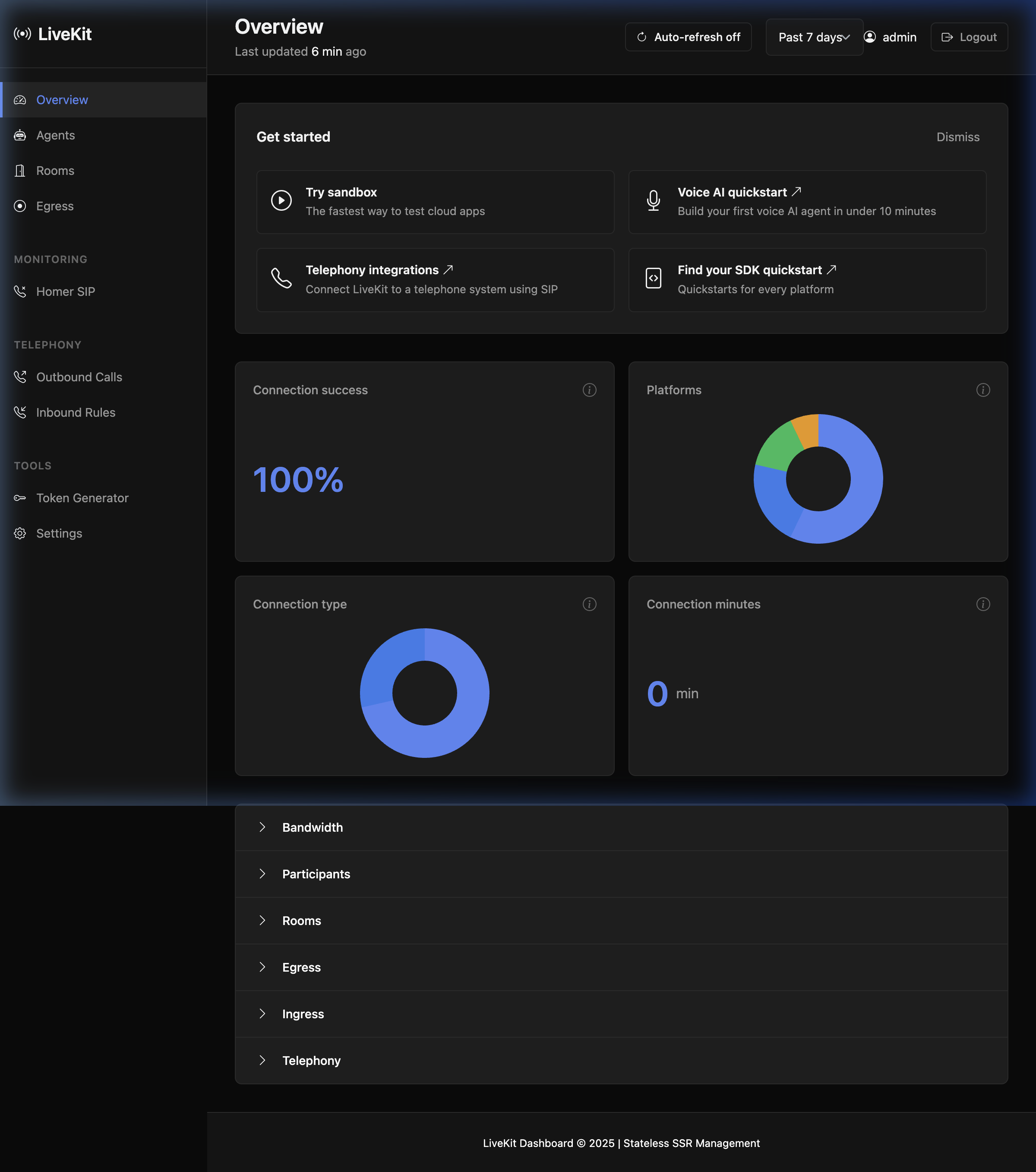
- 🎯 Stateless Architecture - No database, no Redis, no background workers
- 🔐 Simple Authentication - HTTP Basic Auth with one admin account
- 📊 Comprehensive Analytics - Real-time analytics for all LiveKit services
- 🏠 Overview Dashboard - Server status, active rooms, participants count, SDK latency
- 🚪 Room Management - List, create, close rooms; view participants and tracks
- 🎫 Token Generation - Generate join tokens on-the-fly for testing
- 👥 Participant Control - Kick participants, view tracks, connection stats
- 📹 Egress/Recordings - Start/stop composite egress, view active jobs
- 📥 Ingress Monitoring - Stream analytics and connection quality metrics
- 🤖 Agent Management - Dispatch agents to rooms, view job status and success rates
- 📞 SIP Integration - (Optional) Manage SIP trunks, outbound/inbound calls
- 🔍 Homer SIP Monitor - (Optional) Search and analyse SIP calls captured by Homer/SIPCAPTURE
- 🔧 Settings View - Read-only configuration and server info
- 🧪 Sandbox - Token generator with HMAC verification helper
📊 Analytics Dashboard
Real-time Analytics
- Connection Success Rate - Based on room health and participant status
- Platform Distribution - Web, iOS, Android, React Native client detection
- Connection Types - WebRTC Direct vs TURN Relay analysis
- Session Duration - Live calculation from participant join times
Service-Specific Analytics
- Room Analytics - Active rooms, participant distribution, room sizes
- Egress Analytics - Job status, success rates, storage usage, type distribution
- Ingress Analytics - Stream monitoring, connection quality, bitrate analysis
- Agent Analytics - Dispatch counts, job status breakdown, success rates per agent
- SIP Analytics - Trunk status, call volume, dispatch rules (when enabled)
- Homer SIP Analytics - Per-call flow diagrams, SIP message inspection, session metrics (when enabled)
Visual Components
- Interactive Charts - Chart.js doughnut charts for data distribution
- Responsive Design - Mobile-friendly analytics cards
- Real-time Updates - Live data from LiveKit APIs
- Error Handling - Graceful fallbacks and debug information
🏗️ Architecture
┌─────────────────────────────────────────────────────┐
│                    User Browser                     │
│              (HTTP Basic Auth)                      │
└────────────────────┬────────────────────────────────┘
                     │ HTTPS
                     ▼
┌─────────────────────────────────────────────────────┐
│           FastAPI + Jinja2 (SSR)                    │
│  ┌─────────────────────────────────────────────┐   │
│  │  Routes: Overview, Rooms, Egress, SIP...    │   │
│  └─────────────────┬───────────────────────────┘   │
│                    │                                 │
│  ┌─────────────────▼───────────────────────────┐   │
│  │      LiveKitClient (SDK Wrapper)            │   │
│  └─────────────────┬───────────────────────────┘   │
└────────────────────┼────────────────────────────────┘
                     │ SDK API Calls
                     ▼
┌─────────────────────────────────────────────────────┐
│              LiveKit Server                         │
│         (Your Private Deployment)                   │
└─────────────────────────────────────────────────────┘
Key Principles
- Stateless: All data is fetched directly from LiveKit on each request
- SSR: Server-side rendered HTML with Jinja2 templates
- Progressive Enhancement: HTMX for auto-refresh and better UX
- Secure: HTTP Basic Auth, CSRF protection, security headers
- Minimal: No external dependencies beyond FastAPI and LiveKit SDK
🚀 Quick Start
Prerequisites
- Python 3.10 or higher
- A running LiveKit server instance
- LiveKit API key and secret
Option 1: Using Poetry (Recommended)
# Clone the repository
git clone <repository-url>
cd livekit-dashboard

# Install dependencies
make install

# Create and configure .env file
make env-example

# Edit .env with your LiveKit credentials
nano .env

# Run in development mode
make dev
Option 2: Using Docker
# Clone the repository
git clone <repository-url>
cd livekit-dashboard

# Create .env file
cp .env.example .env

# Edit .env with your credentials
nano .env

# Build and run with Docker Compose
make docker-run

# Or manually:
docker-compose up -d
Option 3: Manual Setup
# Install Poetry
curl -sSL https://install.python-poetry.org | python3 -

# Install dependencies
poetry install

# Set environment variables
export LIVEKIT_URL="https://your-livekit-server.com"
export LIVEKIT_API_KEY="your-api-key"
export LIVEKIT_API_SECRET="your-api-secret"
export ADMIN_USERNAME="admin"
export ADMIN_PASSWORD="secure-password"
export APP_SECRET_KEY="$(openssl rand -hex 32)"

# Run the application
poetry run uvicorn app.main:app --host 0.0.0.0 --port 8000
🔧 Configuration
All configuration is done via environment variables. Create a .env file:
# LiveKit Server Configuration
LIVEKIT_URL=https://your-livekit-server.com
LIVEKIT_API_KEY=your-api-key
LIVEKIT_API_SECRET=your-api-secret

# Admin Authentication
ADMIN_USERNAME=admin
ADMIN_PASSWORD=changeme

# Application Settings
APP_SECRET_KEY=your-secret-key-for-csrf-and-sessions
DEBUG=false
HOST=0.0.0.0
PORT=8000

# Feature Flags
ENABLE_SIP=false
Environment Variables
| Variable | Required | Default | Description |
|---|---|---|---|
LIVEKIT_URL | ✅ | - | LiveKit server URL (e.g., https://your-server.com) |
LIVEKIT_API_KEY | ✅ | - | LiveKit API key |
LIVEKIT_API_SECRET | ✅ | - | LiveKit API secret |
ADMIN_USERNAME | ✅ | admin | Dashboard admin username |
ADMIN_PASSWORD | ✅ | changeme | Dashboard admin password |
APP_SECRET_KEY | ✅ | - | Secret key for CSRF tokens (generate with openssl rand -hex 32) |
DEBUG | ❌ | false | Enable debug mode |
HOST | ❌ | 0.0.0.0 | Host to bind to |
PORT | ❌ | 8000 | Port to listen on |
ENABLE_SIP | ❌ | false | Enable SIP features |
ENABLE_HOMER | ❌ | false | Enable Homer SIP Monitor tab |
HOMER_URL | ❌* | - | Homer server base URL (e.g., https://homer.example.com) |
HOMER_USERNAME | ❌* | - | Homer login username |
HOMER_PASSWORD | ❌* | - | Homer login password |
* Required when
ENABLE_HOMER=true
📖 Usage
Accessing the Dashboard
- Open your browser and navigate to
http://localhost:8000 - Enter your admin credentials when prompted
- You'll see the overview dashboard with server stats
Main Features
Overview Page (/)
- View server status and health
- See total rooms and participants
- Monitor SDK latency
- Quick access to recent rooms
Rooms (/rooms)
- List all active rooms
- Create new rooms with custom settings
- View room details and participants
- Close/delete rooms
- Generate join tokens for participants
Egress (/egress)
- List active egress jobs
- Start room composite recordings
- Stop active recordings
- View file outputs and download URLs
Agents (/agents)
- Fleet overview — all agent dispatches grouped by agent name
- Per-agent detail page with job status breakdown and success rate chart
- Dispatch agents to rooms with optional metadata
- Delete active dispatches
- Job-level metrics: running, success, pending, failed counts
SIP (/sip-outbound, /sip-inbound)
- View configured SIP trunks
- Create outbound SIP calls
- View inbound dispatch rules
Homer SIP Monitor (/homer) (optional)
Requires ENABLE_HOMER=true and Homer/SIPCAPTURE credentials in your .env.
- Search calls by Call-ID, From/To user, SIP method, source/destination IP, From/To tag, and time range
- Call-ID fast lookup — searches directly via the transaction endpoint, finding calls regardless of age (bypasses Homer's 200-record cap)
- Call detail with five tabs:
- Flow — ladder diagram with color-coded SIP arrows, port numbers, first SIP line, timestamps, and +offset per message; click any arrow to view the full raw SIP text in a modal
- Messages — sortable table of all SIP messages; expand any row to see the raw SIP headers and SDP body
- Session Info — call parties (UAC/UAS), timing metrics (ringing delay, setup time, disconnect delay, session duration), status badge, and method distribution doughnut chart
- Logs — HEP-LOG entries captured alongside the SIP messages
- Export — download the complete call transaction as a JSON file
Token Generator (/sandbox)
- Generate test tokens for development
- Customize permissions and TTL
- Copy tokens to clipboard
- Quick links to test apps
Settings (/settings)
- View server configuration
- Check connection status
- Review security settings
- See feature flags
🛠️ Development
Available Commands
make help          # Show all available commands
make install       # Install dependencies
make dev           # Run in development mode with auto-reload
make run           # Run in production mode
make test          # Run tests
make test-cov      # Run tests with coverage report
make fmt           # Format code with Black
make lint          # Lint code with Ruff and mypy
make clean         # Clean up cache and temporary files
make docker-build  # Build Docker image
make docker-run    # Run with Docker Compose
make docker-stop   # Stop Docker services
make docker-logs   # View Docker logs
Project Structure
livekit-dashboard/
├── app/
│   ├── main.py                 # FastAPI application entry point
│   ├── routes/                 # Route handlers
│   │   ├── overview.py         # Overview/dashboard
│   │   ├── rooms.py            # Room management
│   │   ├── egress.py           # Egress/recordings
│   │   ├── agents.py           # Agent dispatch management
│   │   ├── sip.py              # SIP telephony
│   │   ├── homer.py            # Homer SIP Monitor
│   │   ├── settings.py         # Settings page
│   │   ├── sandbox.py          # Token generator
│   │   └── auth.py             # Authentication
│   ├── services/               # Business logic
│   │   ├── livekit.py          # LiveKit SDK wrapper
│   │   └── homer.py            # Homer JWT auth + API client
│   ├── security/               # Security modules
│   │   ├── basic_auth.py       # HTTP Basic Auth
│   │   └── csrf.py             # CSRF protection
│   ├── templates/              # Jinja2 templates
│   │   ├── base.html.j2        # Base template
│   │   ├── index.html.j2       # Overview page
│   │   ├── rooms/              # Room templates
│   │   ├── egress/             # Egress templates
│   │   ├── agents/             # Agent templates
│   │   ├── sip/                # SIP templates
│   │   ├── homer/              # Homer SIP Monitor templates
│   │   │   ├── index.html.j2   #   Search + results page
│   │   │   └── call.html.j2    #   Call detail (5 tabs)
│   │   ├── settings.html.j2    # Settings page
│   │   └── sandbox.html.j2     # Token generator
│   └── static/                 # Static assets
│       ├── css/                # Stylesheets
│       └── js/                 # JavaScript
├── Dockerfile                  # Docker image definition
├── docker-compose.yml          # Docker Compose configuration
├── pyproject.toml              # Python dependencies
├── Makefile                    # Development commands
└── README.md                   # This file
🔒 Security
Best Practices
-
Always use HTTPS in production
- Configure a reverse proxy (nginx, Caddy) with TLS
- Update security headers accordingly
-
Change default credentials
export ADMIN_USERNAME="your-admin-user" export ADMIN_PASSWORD="$(openssl rand -base64 32)" -
Generate a strong secret key
export APP_SECRET_KEY="$(openssl rand -hex 32)" -
Keep LiveKit credentials secure
- Never commit
.envfiles - Use environment variable injection in production
- Rotate API keys regularly
- Never commit
-
Enable security headers
- HSTS, CSP, X-Frame-Options (enabled by default)
- Adjust Content-Security-Policy for your needs
-
Rate limiting (optional)
- Consider adding rate limiting middleware
- Use a reverse proxy with rate limiting
Security Headers
The application automatically sets these security headers:
X-Content-Type-Options: nosniffX-Frame-Options: DENYX-XSS-Protection: 1; mode=blockReferrer-Policy: strict-origin-when-cross-originStrict-Transport-Security(in production)Content-Security-Policy(restrictive by default)
🐳 Docker Deployment
Production Deployment with Docker
# 1. Build the image
docker build -t livekit-dashboard:latest .

# 2. Run with environment variables
docker run -d \
  --name livekit-dashboard \
  -p 8000:8000 \
  -e LIVEKIT_URL="https://your-server.com" \
  -e LIVEKIT_API_KEY="your-key" \
  -e LIVEKIT_API_SECRET="your-secret" \
  -e ADMIN_USERNAME="admin" \
  -e ADMIN_PASSWORD="secure-password" \
  -e APP_SECRET_KEY="$(openssl rand -hex 32)" \
  livekit-dashboard:latest
Docker Compose
# Start services
docker-compose up -d

# View logs
docker-compose logs -f

# Stop services
docker-compose down
🧪 Testing
# Run all tests
make test

# Run with coverage
make test-cov

# Run linting
make lint

# Run formatting
make fmt

# Run all checks
make check
📝 API Endpoints
| Endpoint | Method | Description | Auth Required |
|---|---|---|---|
/ | GET | Overview dashboard | ✅ |
/rooms | GET | List rooms | ✅ |
/rooms | POST | Create room | ✅ |
/rooms/{name} | GET | Room details | ✅ |
/rooms/{name}/delete | POST | Delete room | ✅ |
/rooms/{name}/token | POST | Generate token | ✅ |
/egress | GET | List egress jobs | ✅ |
/egress/start | POST | Start egress | ✅ |
/egress/{id}/stop | POST | Stop egress | ✅ |
/agents | GET | Agent fleet overview | ✅ |
/agents/{name} | GET | Per-agent detail | ✅ |
/agents/dispatch | POST | Create dispatch | ✅ |
/agents/{id}/delete | POST | Delete dispatch | ✅ |
/sip-outbound | GET | SIP outbound page | ✅ |
/sip-inbound | GET | SIP inbound page | ✅ |
/homer | GET | Homer SIP search | ✅ |
/homer/call/{callid} | GET | Homer call detail | ✅ |
/homer/call/{callid}/export.json | GET | Export call JSON | ✅ |
/sandbox | GET | Token generator | ✅ |
/settings | GET | Settings page | ✅ |
/logout | GET | Logout page | ❌ |
/health | GET | Health check | ❌ |
🤝 Contributing
Contributions are welcome! Please follow these guidelines:
- Fork the repository
- Create a feature branch (
git checkout -b feature/amazing-feature) - Commit your changes (
git commit -m 'Add amazing feature') - Push to the branch (
git push origin feature/amazing-feature) - Open a Pull Request
Code Style
- Use Black for Python formatting:
make fmt - Use Ruff for linting:
make lint - Follow existing patterns and conventions
- Add tests for new features
📄 License
This project is licensed under the MIT License - see the LICENSE file for details.
🙏 Acknowledgments
- LiveKit - Open source WebRTC infrastructure
- FastAPI - Modern Python web framework
- Bootstrap - UI framework
- HTMX - Progressive enhancement library
📞 Support
- Documentation: LiveKit Docs
- Issues: GitHub Issues
- Community: LiveKit Discord
🗺️ Roadmap
- WebSocket live updates
- Advanced participant management
- Recording download management
- Multi-user support with roles
- Ingress management
- Analytics and metrics
- Dark mode theme
- Mobile-responsive improvements
✅ Definition of Done
- ✅ App is stateless: no DB/Redis/background workers
- ✅ All data fetched directly from LiveKit per request
- ✅ HTTP Basic Auth using one admin account from env
- ✅ All routes protected except
/healthand/logout - ✅ SSR pages:
/,/rooms,/rooms/{name},/sip-outbound,/sip-inbound,/settings,/sandbox - ✅ Docker image builds and runs with environment variables
- ✅ Secrets never shown in full UI
- ✅ Secure headers enabled
- ✅ CSRF protection on POST forms
- ✅ HTMX for auto-refresh and progressive enhancement
- ✅ Token generation works on-the-fly
- ✅ Room and participant management operational
- ✅ Egress start/stop functionality
- ✅ Agent dispatch management (fleet overview + per-agent detail)
- ✅ SIP features (when enabled)
- ✅ Homer SIP Monitor — call search, flow diagram, message inspection, session metrics, JSON export (when enabled)
Made with ❤️ for the LiveKit community
Tags
Similar Tools
WindChat
v0.dev open-source alternative browser extension
TechEuphoria
Modern web application for technology enthusiasts event
100 Days of Code
Daily challenges - Vibe code with AI
unCover
VerifiedWrite AI-generated cover letters in seconds
Intellectia
VerifiedGuardian against misleading AI-generated content
BeyHub
Completely vibe-coded beyblade web application