Mam Audiofinder
WebUI for audiobook downloads
AI-Agent Assisted
Tier 2README
MAM Audiobook Finder
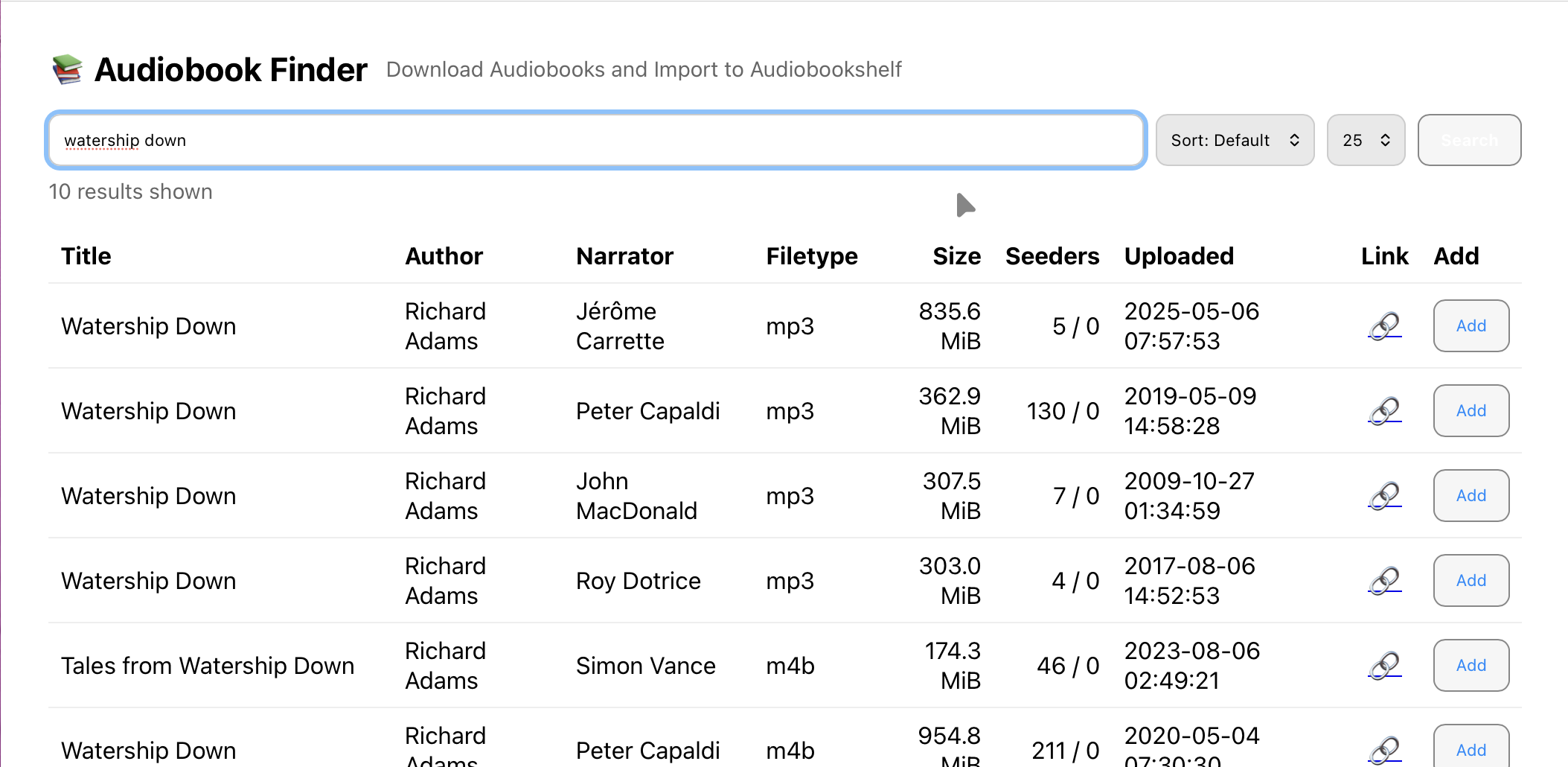
A lightweight web app + API to quickly search MyAnonamouse for audiobooks, add them to qBittorrent, and import completed downloads into your Audiobookshelf library.
Features
- Search MAM by title, author, or narrator
- One-click add to qBittorrent (with its own category)
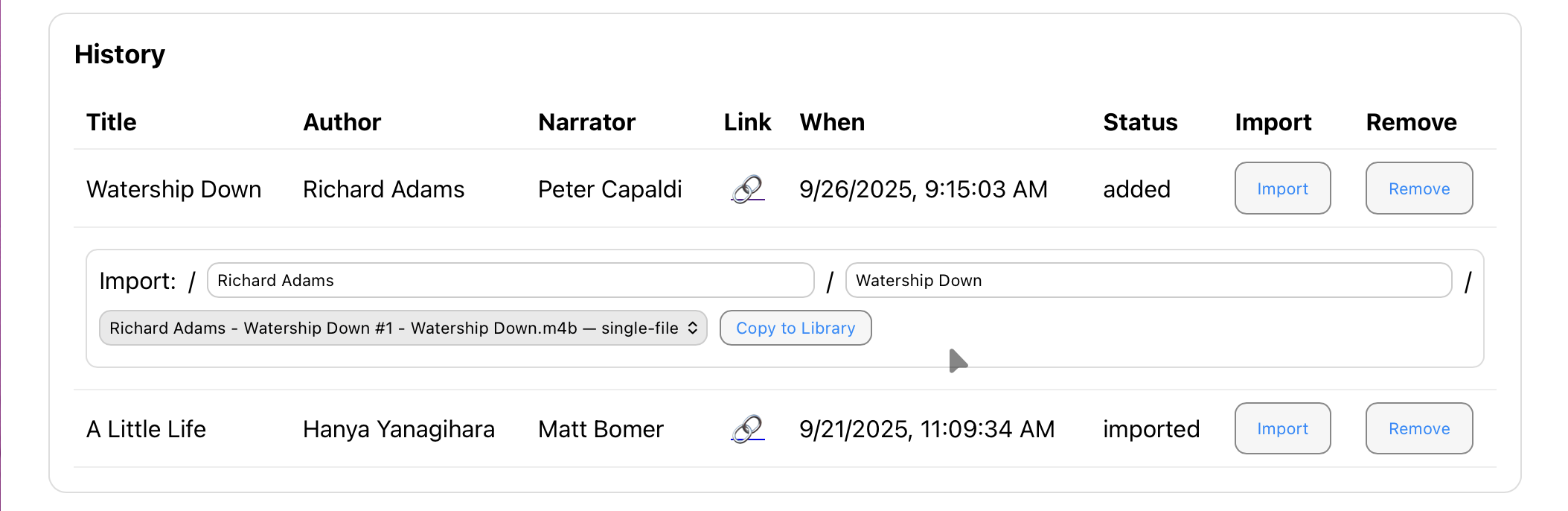
- History view of all books you've added
- Inline import tool to copy or hard-link completed downloads into your Audiobookshelf library
- Minimal, fast UI that works on desktop and mobile
- ZERO AUTHENTICATION (Please don't put this on the open internet. Tailscale or a Cloudflare Tunnel with Cloudflare Access might be good options.)
- Spouse tested and approved
Requirements
- qBittorrent with WebUI enabled
- A valid MAM session cookie
- Docker & Docker Compose
Because You'll Ask
Why build this instead of using Readarr or one of its revivals, forks, or related projects?
- This uses the MAM API directly, not just for finding books but also for metadata. It doesn't rely on any other systems or databases. This is great for me because when a book shows up in my search results I KNOW I can download it, and I know the metadata like narrator and format will be accurate.
- I wanted something I could use from my phone that would be as fast as I could make it. This is very fast.
- This also keeps things dead simple. There's no queue, no requests, no ranking of multiple sources, no usenet, no RSS. Just search, download, and import to library.
Quick Start
This repository includes a docker-compose.yml for Docker users. The usual flow is:
- Clone this repository and
cdinto it:git clone https://github.com/raygan/mam-audiofinder.git cd mam-audiofinder - Copy
.env.example→.envand fill in the required env-only values:- App port and host paths (
APP_PORT,DATA_DIR, and optionallyMEDIA_ROOTif you use the single media mount for hard links) - Container user/permissions (
PUID,PGID,UMASK) - You can either set MAM/qB details here (
MAM_COOKIE,QB_URL,QB_USER,QB_PASS) or leave them commented out and fill them in later via the web setup UI.
- App port and host paths (
- (Optional) I reccomend mounting a single Docker volume (MEDIA_ROOT, mounted as /media) that contains both your qBittorrent downloads AND your Audiobookshelf library, to allow for hard linking insteaed of copying between the two. If you prefer separate mounts instead of a single
MEDIA_ROOT, adjust thevolumessection indocker-compose.ymlas shown in the storage examples below, and setDL_DIR/LIB_DIRin.envto match. - Start the container with Docker Compose:
docker compose up -d - Visit http://localhost:8008 (or your mapped port). On first run, you should land on
/setupto configure MAM, qBittorrent, and library paths.
Environment Variables
| Variable | Description |
|---|---|
MAM_COOKIE | Your MAM session cookie (use ASN-locked cookie) |
QB_URL | qBittorrent WebUI URL (e.g. http://qbittorrent:8080) |
QB_USER | qBittorrent WebUI username |
QB_PASS | qBittorrent WebUI password |
APP_PORT | Host port that exposes the app’s web UI (used in docker-compose.yml) |
MEDIA_ROOT | Host path mounted at /media inside the container (often a root that contains qB downloads and/or Audiobookshelf library; single filesystem recommended for hardlinks) |
DATA_DIR | Host path where this app stores its state (e.g. SQLite DB) |
DL_DIR | In-container path for qBittorrent downloads (default /media/torrents) |
LIB_DIR | In-container path for Audiobookshelf library (default /media/audiobookshelf) |
IMPORT_MODE | link, copy, or move (default link) |
QB_CATEGORY | Category assigned to new torrents (default mam-audiofinder) |
QB_POSTIMPORT_CATEGORY | Category to set after import (empty = unset) |
QB_SAVEPATH | Optional explicit save path sent to qBittorrent when adding torrents |
QB_TAGS | Comma-separated list of tags applied to new torrents (default MAM,audiobook) |
QB_INNER_DL_PREFIX | qBittorrent’s internal download path prefix (default /downloads) |
QB_PATH_MAP | Optional env form of qB → app path mapping (qb_prefix=app_prefix;…) |
PUID | Container user ID (for file permissions, default 99) |
PGID | Container group ID (for file permissions, default 100) |
UMASK | File creation mask (default 0002) |
DISABLE_SETUP | When set to 1/true, hides the setup button and disables /setup and /api/setup after initial configuration |
Storage configuration examples
The app only cares about the in‑container paths DL_DIR (qBittorrent downloads) and LIB_DIR (Audiobookshelf library). How you mount host paths into the container is up to you. For example:
1. Single media root (hardlink‑friendly)
If your downloads and library live under a common parent on the same filesystem, you can use the default single MEDIA_ROOT mount.
Example host layout:
- qB downloads:
/mnt/media/torrents - Audiobookshelf:
/mnt/media/audiobookshelf
.env:
MEDIA_ROOT=/mnt/media
DL_DIR=/media/torrents
LIB_DIR=/media/audiobookshelf
IMPORT_MODE=link
docker-compose.yml (default) already contains:
volumes:
  - ${DATA_DIR}:/data
  - ${MEDIA_ROOT}:/media
Because both DL_DIR and LIB_DIR are under /media (and on the same filesystem), IMPORT_MODE=link can use hardlinks where possible.
2. Separate mounts (downloads and library on different paths)
If your downloads and library are on different host paths (for example, separate disks/volumes, or you don’t want to mount a large media tree), you must update docker-compose.yml to mount each path explicitly and then point DL_DIR / LIB_DIR at those in-container locations. In this setup, MEDIA_ROOT is not used.
Example host layout:
- qB downloads:
/mnt/disk1/torrents - Audiobookshelf:
/mnt/disk2/audiobooks
docker-compose.yml (adjust or override the volumes section):
volumes:
  - ${DATA_DIR}:/data
  - /mnt/disk1/torrents:/downloads
  - /mnt/disk2/audiobooks:/library
.env:
DL_DIR=/downloads
LIB_DIR=/library
# MEDIA_ROOT is unused in this layout
Hardlinks will still work if /downloads and /library end up on the same underlying filesystem; otherwise the app automatically falls back to copying files.
This project was created to scratch a personal itch, and was almost entirely vibe-coded with OpenAI Codex. I will probably not be developing it further, looking at issues, or accepting pull requests. Do not run this on the open internet! Are you a real developer? Do you want to fork or rewrite this project and make it not suck? Go for it!
License
MIT — provided as-is, no warranty.
Tags
Similar Tools
Nano Banana Desktop
Inpainting utility and image editor
Subtrackr
Self-hosted subscription tracker
Snaike
GameBoy snake game
GDevelop
Cross-platform game engine for game development
Context Engineering Intro
Context engineering for AI coding assistants
WindChat
v0.dev open-source alternative browser extension